Wednesday, 8 October 2014

Timeout expired. The timeout period elapsed prior to obtaining a connection from the pool. This may have occurred because all pooled connections were in use and max pool size was reached.

You use more than Max Pool Size connections (Max Pool Size default=100)
This is fairly rare in most applications, 100 concurrent connections is a very large number when you are using pooling. In my experience the only time this has been the cause of the exception above is when you open all 100 connections in a single thread as shown below:


      SqlConnection[] connectionArray = new SqlConnection[101];
      for (int i = 0; i <= 100; i++)
      {
                  connectionArray[i] = new SqlConnection("Server=.\\SQLEXPRESS ;Integrated security=sspi;connection timeout=5");
                  connectionArray[i].Open();
      }
Solution: Once you have determined that you are using more than 100 concurrent connections (with the same connection string) you can increase Max Pool Size.

2)   You are leaking connections
My definition of a leaked connection is a connection that you open but you do not Close _OR_ Dispose explicitly in your code. This covers not only the times when you forget to make the connection.Close() or Dispose() call in your code, but the much harder to catch scenarios where you _do_ call connection.Close but it does not get called! See below:

using System;
using System.Data;
using System.Data.SqlClient;

public class Repro
{
      public static int Main(string[] args)
      {
                  Repro repro = new Repro();
                  for (int i = 0; i <= 5000; i++)
                  {
                              try{ Console.Write(i+" "); repro.LeakConnections(); }
                              catch (SqlException){}
                  }

                  return 1;
      }
      public void LeakConnections()
      {          
                  SqlConnection sqlconnection1 = new SqlConnection("Server=.\\SQLEXPRESS ;Integrated security=sspi;connection timeout=5");
                  sqlconnection1.Open();
                  SqlCommand sqlcommand1 = sqlconnection1.CreateCommand();
                  sqlcommand1.CommandText = "raiserror ('This is a fake exception', 17,1)";
                  sqlcommand1.ExecuteNonQuery();  //this throws a SqlException every time it is called.
                  sqlconnection1.Close(); //We are calling connection close, and we are still leaking connections (see above comment for explanation)
      }
}

Paste this code into visual studio and place a breakpoint in the sqlconnection1.Close(); line, it will never get called since ExecuteNonQurery throws an exception. After a short while you should see the dreaded Timeout exception, in my computer it happens at around 170 connections. This is definitely a contrived example, I am stacking the deck by lowering the connection timeout and throwing an exception every call, but when you consider moderate to heavy load on an ASP.NET application any leak is going to get you in trouble.


[EDIT: Duncan Godwin has correctly pointed out that there is a known bug with VS where this exception is thrown] 
3) You are rapidly opening or closing connections with sql debugging enabled in Visual Studio.
There is a known bug with Visual Studio 2003 and Sql Debugging, take a look at http://support.microsoft.com/default.aspx?scid=kb;en-us;830118


How to tell whether you are leaking connections in ADO.NET 2.0

It was very hard to figure out if you were leaking connections in v1.0 and v1.1. We have added new performance counters (see my blog below for more information) that not only kind of work (a little tongue in cheek here) but address hard to find areas like this. With ADO.NET 2.0 if you see the NumberOfReclaimedConnections performance counter go up you know that your application is leaking connections.


Beware of fixes involving the connection string! (IMPORTANT!)
Modifying the connection string can give you temporary relief from hitting this exception, so it can be very tempting. this comes at a high performance cost, you really need to fix your leak.

Here is a list of bad things to do to make it “kind of work” (also known as “shoot yourself in the foot”):
(Do not do) Pooling = False.
Fairly straightforward, if you turn pooling off you will never hit the timeout exception Of course you get no pooling with the performance drop that that involves. You are still leaking connections.
(Do not do) Connection Lifetime = 1;
This does not eliminate the exception altogether but it will probably come close. What you are telling us to do is to throw away from the pool any connection that has been used for more than one second (the lifetime check is done on connection.Close()). I see very little difference between this and turning pooling off, it is just plain bad. While I am talking about this connection string keyword here is a general warning. Do not use Connection Lifetime unless you are using a database cluster.
      (Do not do) Connection Timeout= 40000;
Terrible choice, you are telling us to wait forever for a connection to become available before throwing the timeout exception. Fortunately ASP.NET will do a thread abort after three minutes.
(Do not do) Max Pool Size=40000;
If you raise Max Pool Size high enough you will eventually stop getting this exception, the downside is that you will be using a much larger number of connections than what your application really needs. This does not scale well.


Solution:
You need to guarantee that the connection close _OR_ dispose gets called. The easiest way is with the “using” construct, modify your  LeakConnections() method as follows:


      public void DoesNotLeakConnections()
      {          
                  Using (SqlConnection sqlconnection1 = new SqlConnection("Server=.\\SQLEXPRESS ;Integrated security=sspi;connection timeout=5")) {
                              sqlconnection1.Open();
                              SqlCommand sqlcommand1 = sqlconnection1.CreateCommand();
                              sqlcommand1.CommandText = "raiserror ('This is a fake exception', 17,1)";
                              sqlcommand1.ExecuteNonQuery();  //this throws a SqlException every time it is called.
                              sqlconnection1.Close(); //Still never gets called.
                  } // Here sqlconnection1.Dispose is _guaranteed_
      }

SqlClient Pooling Q and A:

Q:Why does this work?
A:The Using construct is equivalent to a Try/…/Finally{ <using object>.Dispose() ). Even when ExecuteNonQuery tries to throw out of the execution scope we guarantee that the code in the Finally block will get called.

Q:In the code above, wouldn’t we be calling Close and Dispose if no exception is thrown?
A:We can call Close or Dispose (or both) multiple times without any problems. Calling Close or Dispose on a Closed or Disposed connection is a no-op

Q:What is the difference between Close and Dispose and which one should I call?
A: You can call either one or both, they do practically the same thing.

Q:What do you mean by “practically the same thing”
A: Dispose will clean the connection string information from the SqlConnection and then call Close. There are no other differences, you can verify this by using reflector.

Q: Does connection.Dispose() remove the connection from the pool versus Close()?
A: No, see above.

Q: Do I also need to explicitly close an open data reader on the connection, which would require nested using statements.

A: I would recommend explicitly disposing any ado.net object that implements IDisposable. In many cases this is overkill but it is guaranteed to work (or to be a high priority bug that we need to fix yesterday) and it protects you against future changes in the framework. 

Tuesday, 7 October 2014

Indexes in SQL Server

One of the important parts of SQL Server development and optimization is the creation of indexes. In order to create proper indexing strategies it is necessary to understand how indexes work. This tutorial will guide you step by step to understand some index basics.
There are only two different types of indexes. Clustered and NonClustered. There can only be one clustered index on a table and the reason is simple:
  • A Clustered index is the data of table sorted according to the columns you choose.
  • A NonClustered index is just like the index of a book. It contains data sorted so that it’s easy to find, then once found, it points back to the actual page that contains the data. (In other words, it points back to the clustered index)
Suppose we are reading a book about biographical information of all the U.S. Presidents, and the book itself orders the biographies starting from the first president to the latest president. This ordering of the pages would represent the clustered index.
Now suppose you asked two different people to find Franklin D. Roosevelt’s biography. Person-A was a historian and Person-B was unschooled. Person-A would quickly be able to find the presidents biography while Person-B would have to scan through each page in order to find the biography. Even if the Person-B used the book’s index (akin to the non-clustered index), he would still have to search for the page after he found the page number.
So it is always faster to find information off of the clustered index because the data in already at the “leaf-level” off the index.
The clustered index should be a key that does not get modified. It should also ideally be sequential so that the underlying data pages do not become fragmented [more information]
With this information, how do we determine what the clustered index should be? Well, it depends on the population of the people searching for the biographies. If it is mostly unschooled people, then it would be more efficient to sort the book alphabetically rather than the historical order of the presidents.
Now let’s say that 75% of the population are historians and the other 25% are unschooled. Let’s assume the data the historians will need consists of a lot of different information regarding the president’s biographies, while all the unschooled need is the president’s age at the time they took office. In this scenario, it is more plausible to keep the ordering of the book (or the clustered index) based on the order of the president, then simply add the age of the president in the back index of the book (the non clustered index). That way the unschooled people do not have to look into the front of the book (clustered index) for the president’s age. They could simply find it in the back of the book by doing one single lookup. The presidents age being stored in the rear index would be considered at the “leaf” level. This would satisfy both requirements and would be efficient for both historians and the unschooled group.
First let’s create our president’s table download and run: PresidentsTable
After running, let’s turn on the execution plan (In SQL Server Managment Studio place your mouse in the query window and select Query -> Include Actual Execution Plan)
Now execute the following query:
SELECT
    PresidentNumber
    ,President
    ,YearsInOffice
    ,YearFirstInaugurated
FROM Presidents
WHERE PresidentNumber = 32
Now let’s view the execution plan:
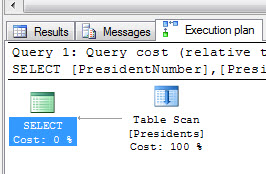
tablescanexecutionplan
Without a clustered index, our book is in no particular order. To find president 32, we need to scan every page.
Now let’s add a clustered index so we can organize our book according to PresidentNumber:
CREATE UNIQUE CLUSTERED INDEX IDX_C_Presidents_PresidentNumber ON Presidents(PresidentNumber)
And let’s run our query again:
SELECT
    PresidentNumber
    ,President
    ,YearsInOffice
    ,YearFirstInaugurated
FROM Presidents
WHERE PresidentNumber = 32
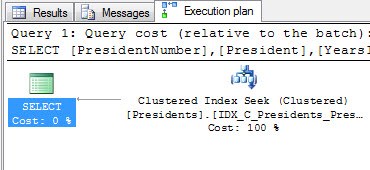
tableseekexecutionplan
Our execution plan now shows a “clustered index seek”. Meaning we did not have to look through every page of our book. We jumped right to page 32 and found the information on our president there.
In summary, when we look up information based on the clustered index (the way the table is physically sorted), we naturally find all the information we are looking for already there (President, YearsInOffice, YearFirstInaugurated).
Now, let’s create a non clustered index and look up the YearFirstInaugurated by president’s name:
CREATE NONCLUSTERED INDEX IDX_NC_Presidents_President ON Presidents(President)
Now let’s run our query to find the YearFirstInaugurated:
-- Force our query to use the index
-- (table is so small SQL Server bypasses it)
SELECT
    YearFirstInaugurated
FROM Presidents WITH(INDEX(IDX_NC_Presidents_President))
WHERE President = 'Franklin Roosevelt'
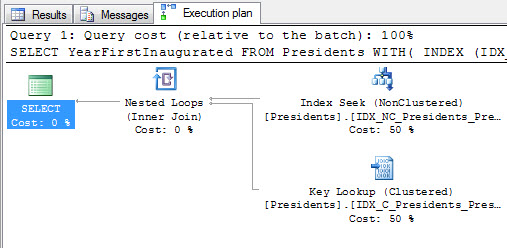
If we look at our execution plan now, we will see that we initially looked the president’s name up in our index, then after finding the page where the presidents biography was located, we went to that page to grab the YearFirstInaugurated. This is denoted by the “Key Lookup”. (Also known as “Bookmark Lookup”)
bookmarklookup
This is a more expensive operation because our data is not at the “leaf-level” (or inline with the index we just searched), rather it is in the clustered index instead.
So how do we fix this? In SQL Server 2005, a new feature was introduced called “included columns”. This allows us to include data at the leaf-level of an index. So rather than looking up YearFirstInaugurated in the clustered index, we can find it in the nonclustered index. Let’s drop our index and include YearFirstInagurated in our nonclustered index:
DROP INDEX Presidents.IDX_NC_Presidents_President
GO
CREATE NONCLUSTERED INDEX IDX_NC_Presidents_President ON Presidents(President) INCLUDE(YearFirstInaugurated)
And run our query one more time:
-- Force our query to use the index
-- (table is so small SQL Server bypasses it)
SELECT
    YearFirstInaugurated
FROM Presidents WITH(INDEX(IDX_NC_Presidents_President))
WHERE President = 'Franklin Roosevelt'
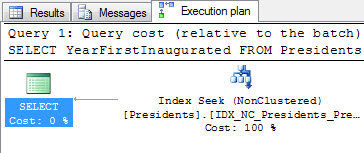
Now we only have an index seek. Because as soon as we looked the president up in the index, we immediately also found the YearFirstInaugurated:
indexseek

Tuesday, 23 September 2014

Performance of Arrays vs. Lists

In a small number of tight-loop processing code where I know the length is fixed I use arrays for that extra tiny bit of micro-optimisation; arrays can be marginally faster if you use the indexer / for form - but IIRC believe it depends on the type of data in the array. But unless you need to micro-optimise, keep it simple and use List<T> etc.
Of course, this only applies if you are reading all of the data; a dictionary would be quicker for key-based lookups.
Here's my results using "int" (the second number is a checksum to verify they all did the same work):
(edited to fix bug)
List/for: 1971ms (589725196)
Array/for: 1864ms (589725196)
List/foreach: 3054ms (589725196)
Array/foreach: 1860ms (589725196)
based on the test rig:
using System;
using System.Collections.Generic;
using System.Diagnostics;
static class Program
{
    static void Main()
    {
        List<int> list = new List<int>(6000000);
        Random rand = new Random(12345);
        for (int i = 0; i < 6000000; i++)
        {
            list.Add(rand.Next(5000));
        }
        int[] arr = list.ToArray();

        int chk = 0;
        Stopwatch watch = Stopwatch.StartNew();
        for (int rpt = 0; rpt < 100; rpt++)
        {
            int len = list.Count;
            for (int i = 0; i < len; i++)
            {
                chk += list[i];
            }
        }
        watch.Stop();
        Console.WriteLine("List/for: {0}ms ({1})", watch.ElapsedMilliseconds, chk);

        chk = 0;
        watch = Stopwatch.StartNew();
        for (int rpt = 0; rpt < 100; rpt++)
        {
            for (int i = 0; i < arr.Length; i++)
            {
                chk += arr[i];
            }
        }
        watch.Stop();
        Console.WriteLine("Array/for: {0}ms ({1})", watch.ElapsedMilliseconds, chk);

        chk = 0;
        watch = Stopwatch.StartNew();
        for (int rpt = 0; rpt < 100; rpt++)
        {
            foreach (int i in list)
            {
                chk += i;
            }
        }
        watch.Stop();
        Console.WriteLine("List/foreach: {0}ms ({1})", watch.ElapsedMilliseconds, chk);

        chk = 0;
        watch = Stopwatch.StartNew();
        for (int rpt = 0; rpt < 100; rpt++)
        {
            foreach (int i in arr)
            {
                chk += i;
            }
        }
        watch.Stop();
        Console.WriteLine("Array/foreach: {0}ms ({1})", watch.ElapsedMilliseconds, chk);

        Console.ReadLine();
    }

Indexers In C#

C# introduces a new concept known as Indexers which are used for treating an object as an array. The indexers are usually known as smart arrays in C# community. Defining a C# indexer is much like defining properties. We can say that an indexer is a member that enables an object to be indexed in the same way as an array.
this [argument list] 
{ 
    get 
    { 
        // Get codes goes here 
    } 
    set 
    { 
        // Set codes goes here 
    } 
} 
Where the modifier can be private, public, protected or internal. The return type can be any valid C# types. The 'this' is a special keyword in C# to indicate the object of the current class. The formal-argument-list specifies the parameters of the indexer. The formal parameter list of an indexer corresponds to that of a method, except that at least one parameter must be specified, and that the ref and out parameter modifiers are not permitted. Remember that indexers in C# must have at least one parameter. Other wise the compiler will generate a compilation error.

The following program shows a C# indexer in action
// C#: INDEXER 
using System; 
using System.Collections; 

class MyClass 
{ 
    private string []data = new string[5]; 
    public string this [int index] 
    { 
       get 
       { 
           return data[index]; 
       } 
       set 
       { 
           data[index] = value; 
       } 
    } 
}

class MyClient 
{ 
   public static void Main() 
   { 
      MyClass mc = new MyClass(); 
      mc[0] = "Rajesh"; 
      mc[1] = "A3-126"; 
      mc[2] = "Snehadara"; 
      mc[3] = "Irla"; 
      mc[4] = "Mumbai"; 
      Console.WriteLine("{0},{1},{2},{3},{4}",mc[0],mc[1],mc[2],mc[3],mc[4]); 
   } 
} 

Oops InterView

1.) What is object oriented programming (oops) Language?                                       
oops is is a methodology to write the program where we specify the code in form of classes and objects .oops supports   three important features which are given below:
  • Encapsulation 
  • Inheritance
  • Polymorphism
Note:- Abstraction is also basic oops concepts feature.But mainly three important feature of oops.

2.) What is object based Language?                                                                                 
Object based language supports all features of oops except two features which are given below:
  • Inheritance
  • Late binding
3.) What are three principle of  an object oriented language?                                    
  • Encapsulation 
  • Inheritance
  • Polymorphism
4.) Which property of  an object oriented programming is known as data hiding or information hiding? 
Encapsulation

5.) What is Class in c#?                                                                                                        
A Class is a user-defined data type with a template that servers to define its properties.

6.) How does declare the  Class in c#?                                                                              
Syntax:
                       Class classname
                        {
        
                         }
                             
OR


                      Class classname
                        {
                              Variable declaration;
                              Method declaration;
                         }

7.) Which types of properties includes in c# class ?                                                  
  • Indexers
  • Operators
  • Constructors
  • Destructors

8.) What is instance variables  in c# ?                                                                             
Data is encapsulated in a class by placing data fields inside the body of the class .These variables are called instance variables.We can create the instance variables exactly the same way as we create local variable.
Ex. 
        Class student
            {
                   string name;           //instance variables
                   int age      ;               //instance variables
                   money   salary;     //instance variables
          
           }

9.) What is an object  in c# ?                                                                                            
An object is Run time entity of any class,structure or union.
EX.
           Class student
               {
                        int x=10;
                        int y = 20;
                        public void display()
                            {
                                  console.WriteLne(+x);
                                  console.WriteLne(+y);
                               }
                   student st = new student()         //object "st" created
                     st.display();               // Here "st" object is calling the display method of student class
                 }

10.) What is difference between object and instance ?                                                 
An instance is a declaration time entity but an object is a Run time entity in class,structure or union.

11.) What is Method and how to declare it in class ?                                               
An method is used for manipulating the data contained in the class.Methods are used always declared inside the body of the class.
EX.
         class student
           {
              string name ;
              int age ;
            public void GetData (string s,int x)
                    {
                          name = s;
                          age = x ;
                          console.WriteLine(+s);
                          console.WriteLine(+x);
                     }
            }
12.) Can we placed method definition before instance variable in c# ?                   
Yes.

13.) Can we access the variable declared in other method within  same class ?     
NO.

14.) What is access-specifier or modifier in c# ?                                                            
More Details....

15.) How can create an object of class in c# ?                                                                 
C# uses New operator to create the object of the class.
Syntax:
classname objectname = new classname();
                            OR
classname objectname;
objectname=new classname();
EX.
student st = new student();
                            OR
student st;
st = new student();

16.) Can we create more than one object of a class  in c# ?                                         
Yes, all object are independent to each other ,means each have your copy of instance variable. 

17.) What is the syntax for accessing the class member in the class ?                    
Syntax:
objectname . variable name ;
objectname.methodname(parameter-list);

18.) What is constructor in c# ?                                                                                         
A constructor is like a method,It is used to initialization of data member of the class member , when it is created.
There are some properties of constructor in c#.
  • The name of constructor should be same as class name.
  • Constructors can be public,private or protected in the class.
  • Constructor are automatically called when object of class is created.
19.) Is constructor overloading is possible in c# ?                                                       
Yes.

20.) What is partial class in c# ?                                                                                        
More Details...

21.) What is use of 'this' keyword in c# ?                                                                        
There are some reason to use this keyword in c#.which are given below:
  • If we want to refer the current member of the current class then we can use 'this ' keyword to refer that member.
  • If we want to call a specific constructor of class through another constructor of same class the we can specify 'this' keyword without constructor.
  • We can use 'this' keyword when variable name and object name is same.

22.) What is Destructor in c# ?                                                                                         
Destructor is a method that is called when a object is no more required.The name of destructor is same as the class name.It is use prefix '~' .It is used ,to deallocate the memory used by resources within the class.
More Details...

23.) Can we use Nested classes,structs,interfaces and enums  in c# ?                      
Yes.

24.) What is Constant members in class and its use in c# ?                                        
It is used to declared the data fields of class as constant
EX.
           public const int size  =200;
In above Example,member size is assigned by 200 at compile time and can not be changed later.
Constant members are implicitly static often,we can not declare them explicitly using static.
EX.
public static const int size =200;
it is wrong ,it will give compile time error.

25.) What is Readonly members in c# ?                                       
Readonly are basically used to set the constant value at run time.Once value is assigned at run time then you can not change later. 
EX.
class student
{
public readonly int x;
public static readonly int y;
public student (int a)
{
m=x;
}
static student()
{
y=50;
}
}
26) What is properties in c# ?                                                                                           
More Details..

27) What is Indexer in c# ?                                                                                                
More Details..
Note:- Indexers are sometimes referred to as 'smart arrays'.

28) What is difference between property and Indexer in c# ?                                   
  • Indexer is always an instance member whereas property can be static member.
  • A Get accessor of a property corresponds to a method with no parameters whereas a Get accessor of an indexer's method the same formal parameter as the indexer.
  • A Set accessor of a property corresponds to a method method with the same formal parameter named value,whereas a set accessor of an indexer corresponds to a method with the same formal parameter list as the indexer and the parameter named value.
  • In Indexer,If we declare a local variable with same name as an indexer parameter then it will give error.

29) What is difference between static and Non static member in c# ?                     
More Details..

30) What is Inheritance in c# ?                                                                                       
In  Inheritance, reusability is achieved by designing new classes.Means Derived class inherits the properties of parents class.
More Details..

31) What is Encapsulation in c# ?                                                                                   
More Details..

32) What is Polymorphism in c# ?                                                                                   
Polymorphism,permits the same method name to be used for different operations in different classes.
More Details..

33) What is different form of inheritance in c# ?                                                         
  • Classical inheritance
  • Containment inheritance

34) What is Classical inheritance ?                                                                                   
A classical inheritance supports the "is relationship" between two classes. In this we can create a class hierarchy such that derived class B form , from the parent class A as shown below:
35) What are  the types of Classical inheritance ?                                                       
  • Single Inheritance
  • Multiple Inheritance
  • Multilevel Inheritance
  • Hierarchical Inheritance
  • Hybrid Inheritance
36) What is Containment inheritance in c# ?                                                                
A containment Inheritance supports the "has relationship" between two classes.
EX.
class Teacher
{
..........................
}
class student
{
Teacher T; //Teacher is contained in student.
student s;
.................................................................
}

In this ,object of Teacher(T) is contained in the object of student(s).Means when we create the object of student class then we can easily access the Teacher class member without creating the object of Teacher class.

37) How can we define the subclass in c# ?                                                               
When we define any sub class then we use : (colon operators).
Syntax:
class  subclass-name : Base classname
{
variables declaration;
Method declaration;
.........................................
}

Ex.
class student :Teacher
{

.....//includes the Teacher all fields here.
.....//include your own class features.

}
Description:In above Example,if we create the object of student class then we can easily access both class member data.

38) Is inheritance is transitive in nature ?                                                                      
No.

39) Is this is valid or invalid which are given below ?                                                  
class x : y
{
....................
}
class y : z
{
....................
}
class z : x
{
....................
}
Ans.It is invalid because classes circularly depend on themselves.

40) Is this is valid or invalid which are given below ?                                                 
class x
{
class y:x
{
..........................
}
..........................
}
Ans.It is valid because class does not dependent on the classes that are enclosed.

41) What are  the properties of inheritance in c#?                                                       
  • A derived class extends its direct base class.
  • Derived class can not change or remove the definition of an inherited member.
  • Constructors and destructors are not inherited.
  • Private member of base class can not inherited in child class(derived class).
  • An instance of a class contains a copy of all instance fields declared in the class and its base class.
  • A derived class can override an inherited member.
  • An declared class can hide an inherited members.

42) What do you mean by visibility control in c#?                                                       
In c# ,four types of accessibility modifier,which may be applied to classes and members to specify their level of visibility.
  • public
  • private
  • protected
  • Internal
43) What is "By default" mode of visibility  in c#?                                                       
If we do not explicitly set any modifier with the class then it will be By default"Internal"
Internal classes are accessible within the same program assembly and not accessible from outside the assembly.
More Details...

44) Can we access the all member of base class from derived class?                        
Yes  --> if base class member are public.
No ---> if base class member are private.

45) Can we access the class member if class is private?                                               
No.

46) Can we access the class from outside if class is public and data members are public?
No.

47) What is the accessibility constraints  in c#?                                                           
  • An  accessibility domain of a member is never larger than of the class.
Ex.
class x
{
private class y
{
public int a;
}
}

we can not  access the public data 'a' from the outside the class y.
  • All base class accessibility must be at least accessible as derived class itself.
Ex.

class x
{
.....................
}
class y :x
{
......................
}
It is illegal because x is internal ,we can not access the internal class from the derived class.
  • The return type of method must be at least as accessible as method itself.
EX.
class x
{
......................
}
public class y
{
     x method()
{
.....................//accessible
}
internal x method()
{
..................//accessible
}
public A method ()
{
.....................//not accessible because public is higher than internal

}
Note:- A Method can not have an accessibility level higher than that of its return type.

48) How can access the base class constructor from the derived class                     constructor?
We can access the base class constructor using base keyword from the derived class constructor.
Ex.
using system;
class student
{
public int a;

public int b;
public student (int p,int q)  //base constructor
{
a=p;
b=q;
}
public int calculate()
{
return(a*b);
}
}
class Teacher:student //inheriting student
{
public teacher(int x,int y,int z):base(p,q)
{
int m=z;
}
public int display()
{
return(m*a*b);
}
}
public static void main()
{
Teacher t =new Teacher(15,10,5);
int area = student.show();             //base class method call
int volume = student.display(); //derived class method call
console.WriteLine("Area="+area);
console.WriteLine("Volume="+volume);
console.ReadLine();
}

49) Can we use base keyword instead of constructor logic?                                        
Yes,We use base keyword constructor as well as any sub class to access a public or protected member defined in a parent class.
Ex.
In above example ,we can access the member of base class in child class as:
base a = 20;
base b = 30;
int area = base.show()

50) What is order of execution of constructor in below example?                            
A()  class A         Base class
B()   class B         Derived class
c()  class c            derived class

51) What is method overloading in c#?                                                                           
More Details....

52) What is method Hiding in c#?                                                                                    
More Details....

53) What is abstract class and abstract method in c#?                                                
More Details....

54) What is sealed class in c#?                                                                                           
A class that can not be subclassed ,is called sealed class.

55) Can we inherit the sealed class in c#?                                                                       
No.

56) What is the use of sealed class  in c#?                                                                       
  • Sealed class is used to prevent any unwanted extensions to the class.led class allows the compiler to perform some 
  • Sealed class allows the compiler to perform some optimizations when a method of a sealed class is  invoked.
57) What is sealed methods  in c#?                                                                                   
A sealed Method is used to override an inherited virtual method with the same signature.
Ex.
class student 
{
public virtual void show()
{
console.WriteLine("Hello");
}
}
class teacher :student
(
     public sealed override void show()
{
console.writeLine("Bye");
}
}

Note:- Any derived class of 'teacher' can not further override the method show().

58) What are the types of polymorphism  in c#?                                                           
  • Operation polymorphism
  • Inclusion Polymorphism
59) What is operation polymorphism ?                                                                           
Operation polymorphism is implemented  with the help of overloaded methods and operators.
  • Method overloading
  • Operator overloading
Method overloading and operator overloading is known as  compiler binding or early binding or static binding.This also called compiler time polymorphism.

60) What is Inclusion polymorphism ?                                                                          
Inclusion polymorphism is implemented in the concept of method overriding.In method overriding we use virtual keyword.In method overriding object of class bind at run time,so it is called run time binding or late binding.It is also known as run time polymorphism.

61) What is an Identifier ?                                                                                                 
More Details........

62) What is Ad -hoc -polymorphism in c# ?                                                                    
Ad-hoc-polymorphism is another name of overloading.

63) What are benefits and goals of objected-oriented programming ?                     
  • Reliable
  • Maintainable
  • Extendable
  • Natural
  • Reusable
  • Time saving